 English
 Portuguese
 Spanish
 Italian
 Turkish
 French
 German
 Japanese
 Korean


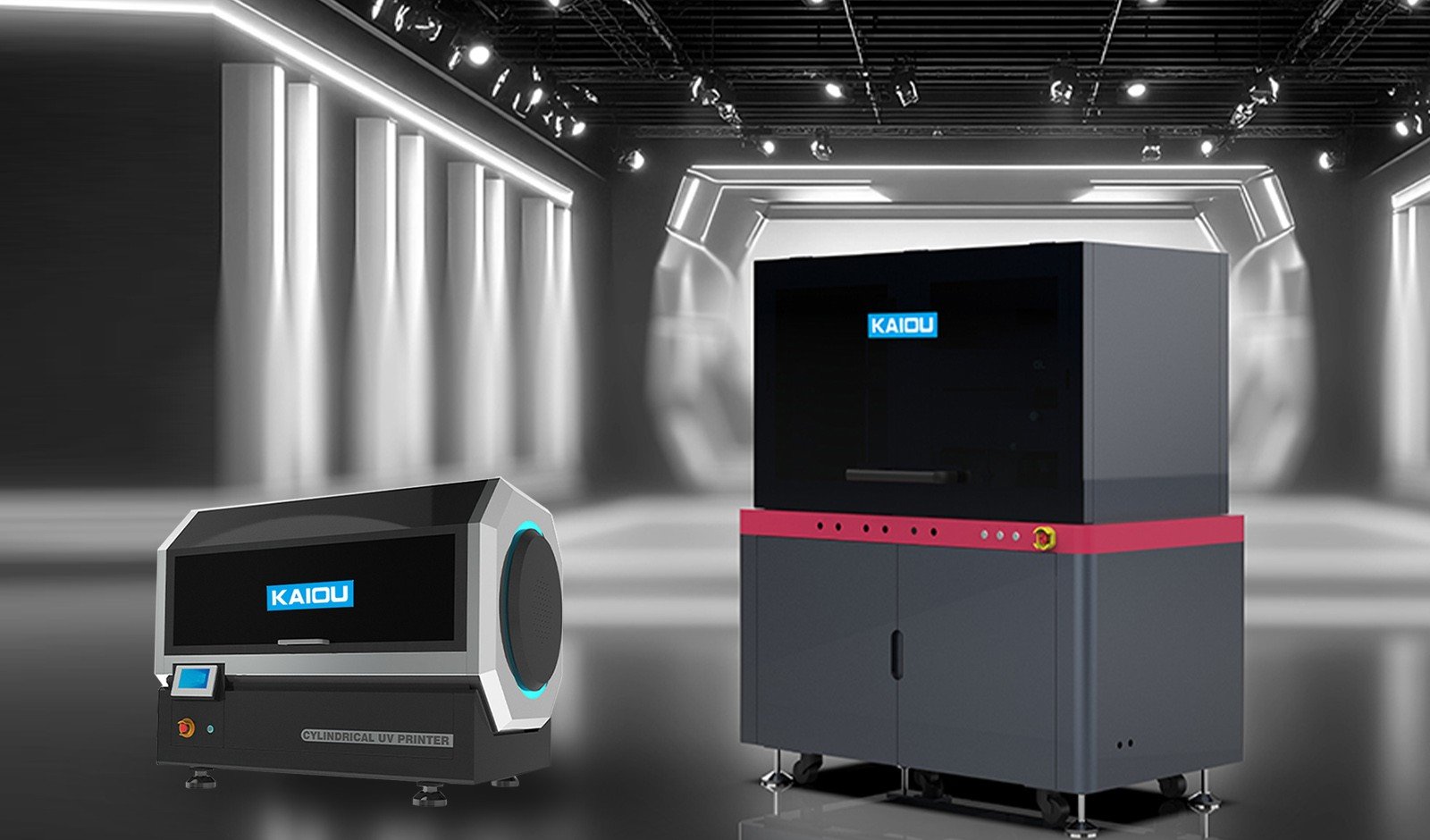



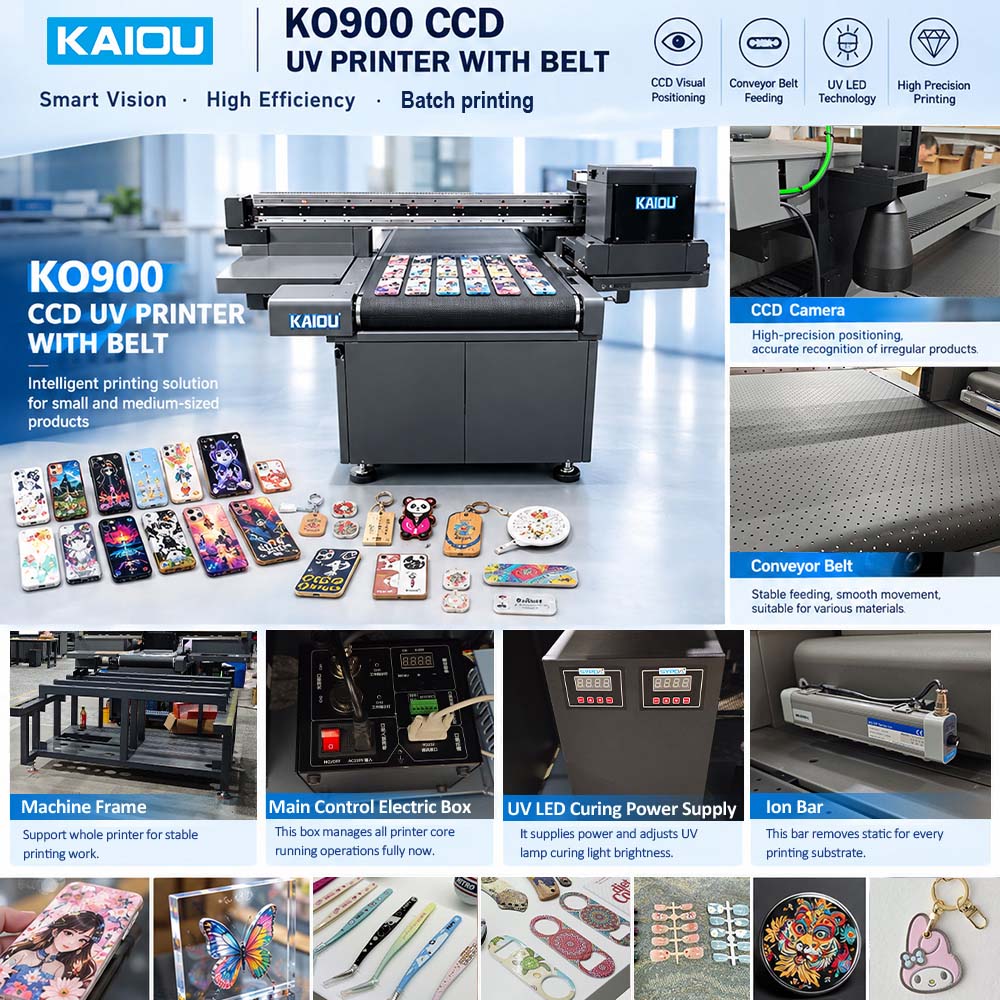
KAIOU KO900 UV Printer with Conveyor Belt System
NewKAIOU KO900 is an industrial UV printer with a conveyor belt system, developed for manufacturers who want to move beyond manual product positioning and build a more efficient, scalable production process. By combining CCD visual recognition, automatic artwork alignment and continuous conveyor feeding, this machine helps streamline printing on compatible products with different shapes, sizes and designs.
Unlike a conventional flatbed printer that often requires operators to position each item individually, the KO900 conveyor UV printer identifies product positions through its vision system and coordinates the printing process accordingly. This makes it a practical choice for manufacturers handling repeat orders, multiple SKUs and customized products, especially when consistent positioning and production efficiency are important.
For businesses looking to take automation further, the KO900 can als
| Model | KO-900 |
| Equipment model | GC-Visual Guide UV |
| Printing size | 900mm |
| Visual system | Industrial Linear 1200DPl High Precision Camera |
| Recognition range | 900mm |
| Nozzle type | Ricoh G5i/G6, Epson i3200 |
| Number ofnozzles | 2~8 |
| Printing color | W+V+KCMY (LC LM LK LLK optional) |
| Printing accuracy | 720x900dpi/720x1200dpi/720x1800dpi |
| Printing height | 150mm |
| Ink system | Dual-channel dual negative pressure system/white ink stirring |
| Transmission system | High-precision magnetic suspension guide rail/double Y power-off self-locking motor |
| Output software | Photoprint |
| Data interface | Gigabit network port/USB3.0 |
| Temperature and humidity | 20-30 degrees celsius/40~80% (no condensation) |
| Electricity requirements | 200-240VAc, single phase electricity, 50/60Hz, current 32 amps1200KG |
| Machine weight | 1200KG |
| Equipment size | 286*208*160cm |
| Wooden box size | 300*220*170cm |
- Description
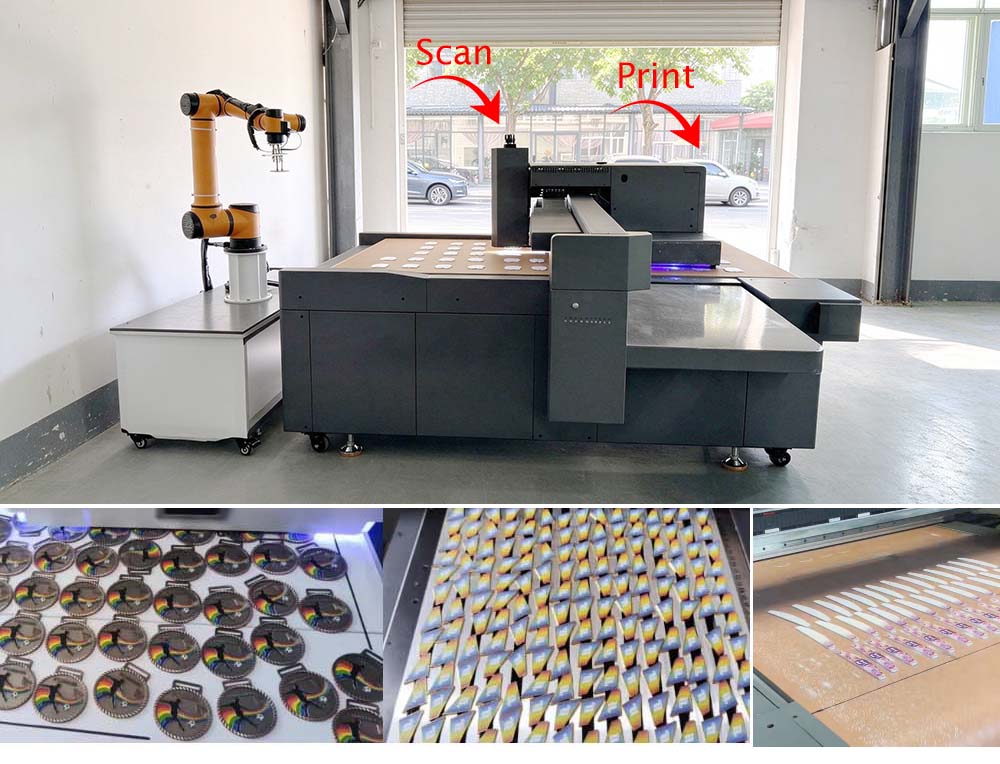
1. Scan and Print Together with CCD Vision Positioning
The KO900 uses an industrial CCD UV printer system to recognize product positions and align artwork with the items moving through the printing area. Instead of requiring an operator to position every product precisely by hand, the camera identifies the product's location so the printing software can coordinate the corresponding print position.
This approach is especially useful for production environments where products are placed on a conveyor at varying positions or where different designs need to be printed within the same production run. It helps reduce the repetitive alignment work associated with conventional printing methods and supports a more consistent workflow.
For manufacturers producing promotional merchandise, customized accessories or other multi-SKU products, scan and print together functionality can make everyday production easier to manage. Actual recognition and alignment performance depends on product shape, surface characteristics, spacing, artwork settings and the selected vision configuration.
2. Continuous UV Printing with an Integrated Conveyor Belt
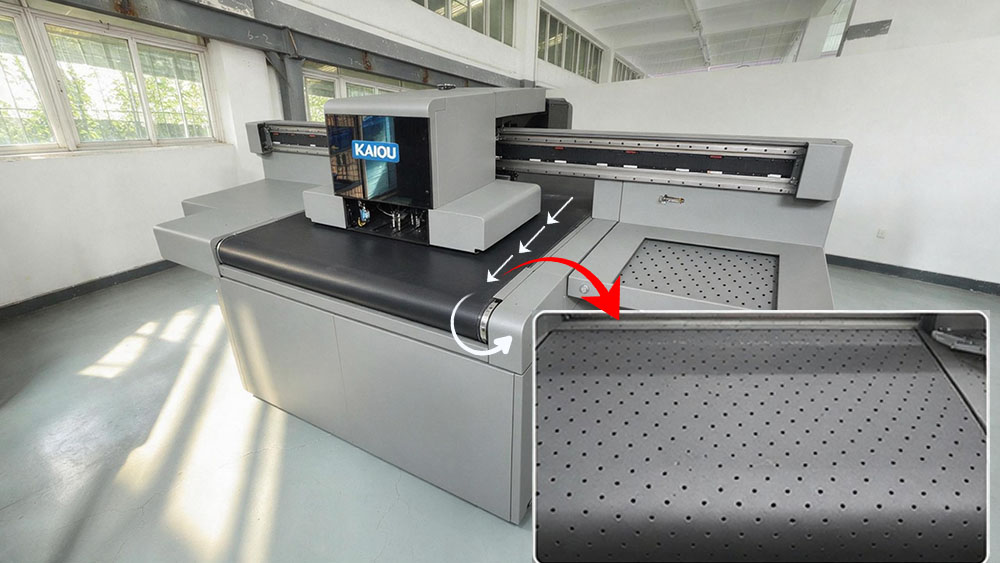
The integrated conveyor belt moves products through the printing area, allowing the KO900 to operate as a continuous UV printing machine rather than relying entirely on a stop-and-start, item-by-item workflow.
Operators can feed compatible products onto the conveyor while the CCD system identifies their positions and the UV printing system applies the corresponding designs. Finished items then move toward the collection area. This workflow is designed to reduce repeated manual positioning and make batch production more organized.
For factories handling recurring orders or large quantities of similar products, a conveyor UV printer can help maintain a more consistent production rhythm. Output depends on artwork coverage, print resolution, printhead configuration, product spacing, curing requirements and the time needed for loading and unloading.
The result is a more streamlined production process in which operators can focus on material preparation, quality checks and output management instead of spending most of their time aligning individual products.
3. Print Different Products in the Same Batch
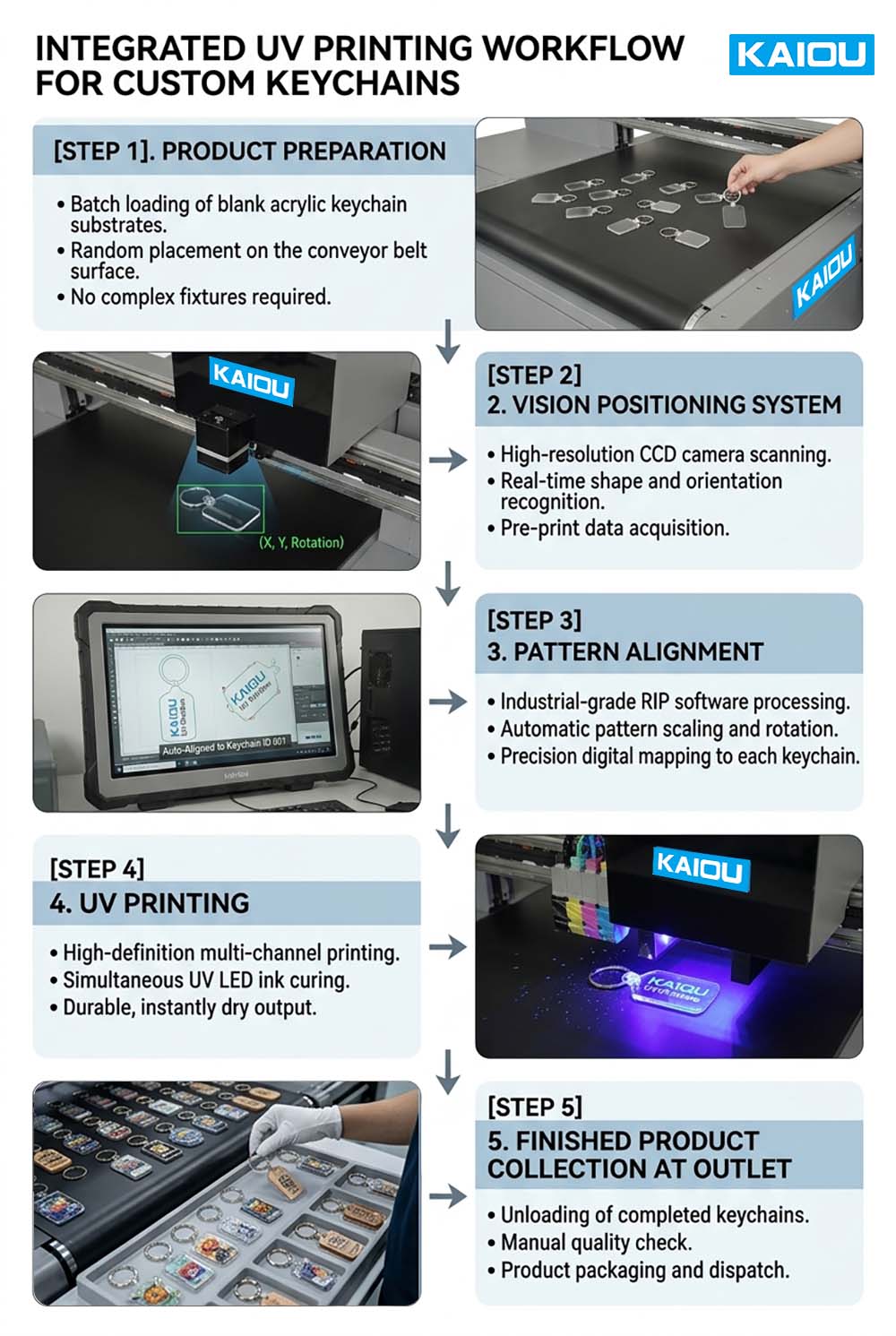
Many manufacturers work with multiple product models, dimensions and designs rather than producing one identical item all day. The KO900 is designed to support flexible printing workflows in which compatible products can be arranged on the conveyor and recognized by the CCD vision system.
Potential applications include acrylic products, plastic components, metal accessories, promotional merchandise, customized gifts and selected industrial parts. This flexibility is useful for businesses that serve different customers, manage multiple SKUs or need to switch between designs without relying on a dedicated positioning fixture for every product.
Whether a particular product can be printed directly depends on its material, surface condition, shape, dimensions and compatibility with UV ink. Sample testing is recommended to confirm adhesion, print quality, positioning accuracy and the most suitable production arrangement before purchase.
4. Industrial Printhead Options for Different Production Requirements
The KO900 supports Epson i3200, Ricoh G5i and Ricoh G6 printhead configurations, allowing manufacturers to select a setup based on their print quality requirements, production targets and budget.
Epson i3200 can be considered for applications that prioritize detailed graphics and consistent output. Ricoh G5i and Ricoh G6 configurations provide additional options for manufacturers evaluating industrial printing performance and production requirements.
The appropriate configuration depends on more than the printhead model alone. The number of printheads, ink channels, artwork complexity, print resolution and required production speed all influence the final setup. KAIOU can recommend a suitable configuration after reviewing your products, expected order volume and print samples.
5. Flexible Color Configuration for Commercial UV Printing
The standard KO900 ink configuration supports CMYK, white ink and varnish. This combination enables full-color graphics on compatible substrates, with white ink helping create a visible color base on suitable dark or transparent materials and varnish adding a selected gloss or surface-effect finish.
Optional light-color channels, including Light Cyan, Light Magenta, Light Black and Light Light Black, may be available for applications requiring additional tonal control.
This flexibility gives manufacturers more options when printing branded merchandise, promotional products, retail accessories and customized items. The final appearance depends on the material, artwork, ink configuration and print settings. If your application requires a specific texture, gloss level or layered effect, send your samples and design files to KAIOU for evaluation.
6. Up to 150 mm Printing Height for Compatible Products
With a maximum specified printing height of 150 mm, the KO900 can accommodate a range of compatible products that are thicker than typical flat promotional items. Potential applications include selected product housings, accessories, packaging components and industrial parts.
Before production, product height, shape and stability must be checked against the machine's actual operating clearance and conveyor setup. Products should remain stable as they move through the printing area, and their surfaces must be suitable for the intended UV printing process.
For businesses printing several product categories, this height capacity offers additional application flexibility without requiring a separate printer for every compatible product type.
7. Configurable Working Widths for Different Production Layouts
The KO900 platform can be discussed in relation to different conveyor and working-width requirements, depending on the intended production layout. Options may include 600 mm, 900 mm and 1,200 mm working widths, with custom configurations subject to engineering confirmation.
The best setup depends on the dimensions of your products, the number of items arranged across the conveyor, the available factory space and the desired integration with upstream or downstream equipment.
Contact KAIOU with your product dimensions and target output to confirm the suitable machine configuration. Final working dimensions and production capacity should be verified in the technical quotation.
Advanced Configuration: AI Robot Arm for Fully Automated UV Printing
For manufacturers looking to reduce repetitive manual handling even further, the KO900 can be integrated with an AI robot arm to create an automatic UV printing line.
In a compatible automation configuration, the robot arm handles product loading and unloading, while the CCD vision system identifies product positions and the industrial UV printer carries out the printing process. These functions can be coordinated into a connected workflow, reducing the need for an operator to place every item manually or repeatedly attend to the same handling tasks.
How the Automated UV Printing Line Works
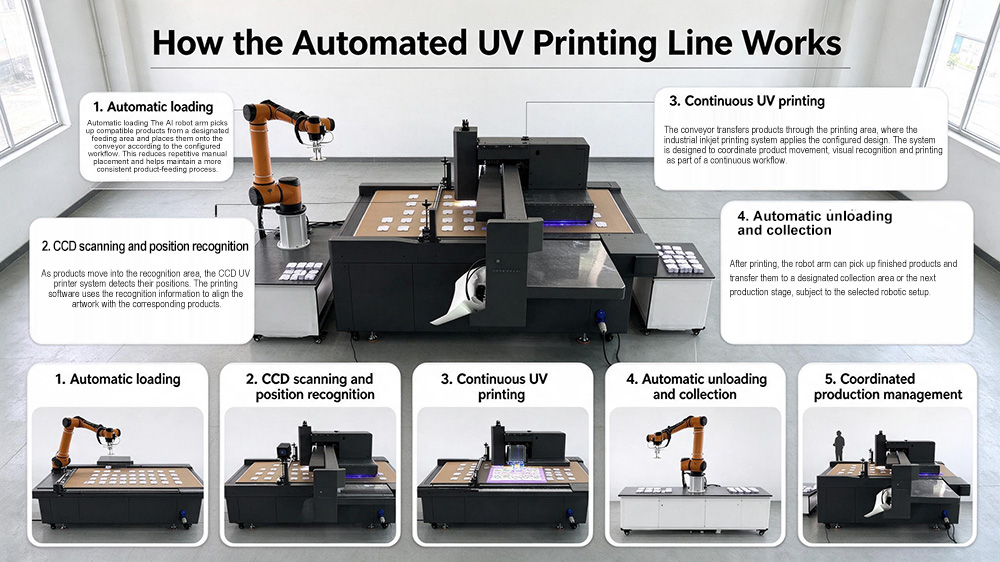
1. Automatic loading
The AI robot arm picks up compatible products from a designated feeding area and places them onto the conveyor according to the configured workflow. This reduces repetitive manual placement and helps maintain a more consistent product-feeding process.
2. CCD scanning and position recognition
As products move into the recognition area, the CCD UV printer system detects their positions. The printing software uses the recognition information to align the artwork with the corresponding products.
3. Continuous UV printing
The conveyor transfers products through the printing area, where the industrial inkjet printing system applies the configured design. The system is designed to coordinate product movement, visual recognition and printing as part of a continuous workflow.
4. Automatic unloading and collection
After printing, the robot arm can pick up finished products and transfer them to a designated collection area or the next production stage, subject to the selected robotic setup.
Coordinated production management
With suitable integration, the robot arm, vision system, conveyor and printer can work together to handle repetitive loading, scanning, printing and unloading tasks. This reduces routine manual intervention and allows personnel to focus on quality control, replenishment, exception handling and production supervision.
Move Beyond Manual Placement
When products are compatible with robotic handling and the full workflow has been properly configured, the automated line can operate with minimal routine operator intervention. This can reduce the need for someone to stand beside the machine placing products one by one throughout the shift.
For factories with repetitive production tasks, the benefits may include more consistent handling, reduced dependence on manual placement and a more structured production process. The achievable level of automation depends on product geometry, feeding arrangements, gripper design, safety requirements, vision integration and the factory's existing workflow.
The AI robot arm is an advanced configuration rather than a standard feature of every KO900 setup. If you require unattended or lights-out production, discuss the complete automation requirements with KAIOU engineering, including material replenishment, finished-product collection, fault detection, safety systems and recovery procedures.
How the Automated UV Printing Line Works
1. Automatic loading: The robot arm picks up compatible products from a designated feeding area and places them onto the conveyor.
2. CCD scanning: The vision system detects product positions and provides the information needed to align the artwork.
3. Continuous UV printing: The conveyor moves products through the printing area while the UV printer applies the configured designs.
4. Automatic unloading: After printing, the robot arm transfers finished products to a designated collection area or the next production stage.
5. Coordinated workflow: The robot arm, CCD system, conveyor and printer work together to reduce repetitive manual handling.
With the appropriate integration, this setup can minimize routine operator intervention and reduce the need for someone to stand beside the machine placing products one by one. It is particularly worth evaluating for repetitive, high-volume production tasks.
The AI robot arm is an optional advanced configuration. The achievable level of automation depends on product geometry, gripper design, material feeding, safety systems and the collection method. Fully unattended operation also requires appropriate material replenishment, fault detection and recovery procedures.
KO900 Conveyor UV Printer vs. Traditional UV Flatbed Printing
| Production Factor | Traditional Manual UV Flatbed | KAIOU KO900 Conveyor UV Printer |
|---|---|---|
| Product positioning | Commonly requires manual placement and alignment | CCD vision recognition supports automatic position detection |
| Product movement | Often depends on manual loading and unloading | Integrated conveyor moves products through the printing area |
| Production workflow | Frequently organized around individual loading cycles | Designed for continuous conveyor-based production |
| Mixed-product jobs | May require repeated manual adjustments | Supports compatible mixed-product layouts through vision recognition |
| Repetitive handling | Operator-dependent | Can be reduced through conveyor operation and optional robotic handling |
| Automation potential | Depends on the existing equipment and workflow | Can be integrated into an automatic UV printing line |
| Production expansion | May require more operator time as volumes increase | Offers a configurable path toward greater automation |
The best choice depends on your product range, order volume, budget and required level of automation. A manual flatbed printer may remain practical for one-off or highly specialized jobs, while a conveyor UV printer is worth evaluating when repetitive positioning and batch handling limit production efficiency.
Ideal Applications for the KO900 Industrial UV Printing Machine
The KO900 conveyor UV printer is designed for manufacturers of promotional gifts, personalized accessories and customized merchandise. It can print on a wide range of compatible materials, including metal, plastic, paper, PVC, leather, glass, sponge and wood, making it suitable for diverse product printing applications.
Popular products include:
Promotional gifts: Keychains, bookmarks, phone cases and custom mirrors
Beauty accessories: Nail files, nail clippers and press-on nails
Customized merchandise: Branded accessories, personalized gifts and advertising products
With CCD vision positioning and a conveyor belt system, the KO900 helps streamline batch printing for products with different designs and shapes. Material compatibility and print adhesion should be confirmed through sample testing before production.
Start Building a More Efficient UV Printing Workflow
If your factory still relies on repetitive manual placement and alignment, the KAIOU KO900 offers a practical way to evaluate conveyor-based industrial UV printing and CCD visual positioning.
Start with the production challenges that matter most to your business: the products you need to print, the number of items in each batch, the required print quality and the amount of manual handling you want to reduce.
The KAIOU team can help you:
Recommend a suitable printhead and ink configuration, including Epson i3200, Ricoh G5i or Ricoh G6 options.
Review your product dimensions, surface materials and artwork requirements.
Evaluate CCD recognition and alignment using representative samples.
Discuss conveyor dimensions and production-line layout.
Assess whether an AI robot arm is suitable for automatic loading and unloading.
Plan a batch UV printing solution based on your production goals.
Send KAIOU your product photos, sample requirements, dimensions and estimated daily output. Our team can help evaluate print compatibility and recommend a suitable configuration for your business.
Contact KAIOU to discuss the KO900 conveyor UV printer and your automation requirements.
Frequently Asked Questions
Q1. Can the KO900 print different shapes and materials in the same batch?
Yes, KAIOU CCD system can print different shapes and material at the same time. If you want to make sure the sample please contact us.
Q2. Does the KO900 require precise manual product placement?
No, the CCD VISION Sytem will scan the proudtion, you don't need to place it one by one.
Q3. Can the KO900 work with an AI robot arm for automatic loading and unloading?
Yes. An optional AI robot arm can be integrated to pick up compatible products, place them onto the conveyor and collect finished items after printing.
The robot, conveyor, CCD vision system and printer must be configured to work together. Gripper design, product orientation, feeding arrangements, safety requirements and the downstream collection method all affect the final automation solution.
Q4. Can the KO900 run without an operator attending the machine?
With a properly engineered AI robot arm configuration and suitable supporting equipment, the production line can automate routine loading, scanning, printing and unloading tasks, reducing the need for continuous manual intervention.
Q5. Is the KO900 suitable for small batches as well as mass production?
Yes, the KO900 is suitable for both large and small production runs—it simply depends on the volume of products you are processing. According to feedback from our clients, this machine can handle the printing of over 10,000 nail files per day.
Q6. How can I determine whether the KO900 will improve my production efficiency?
Start by comparing your current workflow with the proposed conveyor-based process. Record the time spent positioning products, loading and unloading, changing jobs, checking quality and correcting errors.
Then test representative products on the proposed configuration and compare the number of acceptable finished items produced over a realistic working period. If you are considering an AI robot arm, include its handling cycle and the time needed to replenish materials.
This approach provides a more useful estimate of production capacity and labor requirements than relying on print speed alone.
Q7. Can KAIOU test my products before purchase?
KAIOU can discuss sample testing and configuration recommendations based on your products and application requirements. You can provide product samples, photos, artwork files, dimensions and your expected production volume.
The evaluation can help establish whether the material is suitable for UV printing, how well the CCD system recognizes the products and whether a conveyor or robot-arm workflow is appropriate.
Contact KAIOU to discuss sample testing, printhead options and the most suitable configuration for your production needs.